Ways to save BATTERY POWER on Android

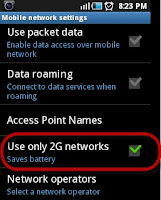
1. Tell the device to only use 2G networks. (Settings » Wireless controls » Mobile networks » Use only 2G networks) If you do not need access to high speed data, or there is no 3G or 4G network where you live, you can tell Android to only use 2G mobile networks. You will still have access to EDGE network data and WiFi if needed.

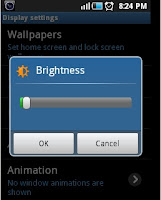
2. Reduce the brightness of your display. (Settings » Sound & Display » Brightness) Most people can see an Android display quite well with the backlighting feature turned off. Move the slider all the way to the left, then try using the device that way. If you cant see it well in that setting, move the slider to the right only as far as necessary to view the display comfortably. Alternatively, Auto brightness coupled with power saving mode (found on most Samsung, LG, Sony, and some Motorola devices) will conservatively adjust the display to the surroundings to only the brightness necessary.

3. If your device has an AMOLED screen, always use a black background. AMOLED screens can reduce power usage sevenfold by displaying black instead of white or any other color. When searching on your phone you can also use Black Google Mobile at bGoog.com to get standard Google results (including images) all in black .
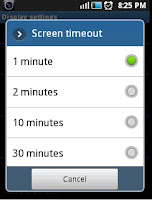
4. Set your screen timeout to the shortest length possible. (Settings » Sound & display » Screen timeout) This setting tells the device to turn off the screen after the selected period of inactivity. The shorter the period, the less power your display will use. The setting options vary from phone to phone.
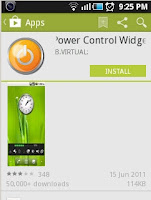
5. Use the Power Control widget. (Home screen » Menu » Add » Widgets » Power control) As of Android 1.6, there is a widget that you can place on any one of your home screens that gives you quick control buttons for WiFi, Bluetooth, GPS, Push sync, and screen brightness (three levels). Use this to control your settings and turn them off to save battery power, as stated above. This is a nice easy shortcut.
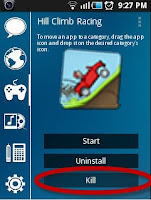
6. Do not leave applications running when you dont need them. Close them and return to the home screen.
7. Switch of wi-fi, bluetooth, data networks when not in use since they consume battery while searching for signals. 

The top free power management apps available in the google play are :

BATTERY SAVER DU 

BATTERY Dr SAVER


Read More..

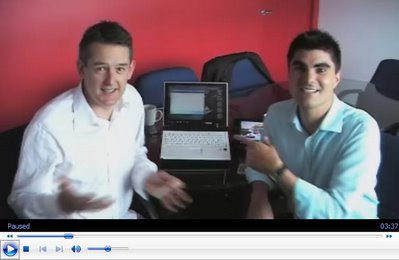
Jon Dee and Hugo Ortega back on Monday


Hi guys! I know many of you are waiting and I have failed to produce. There is a good reason however in that Jon and I had always planned this date (Monday 5th of March) and it was I that had enthusiastically, and mistakenly, promoted it as last Monday to you my readers.

Sorry! It will be worth the wait I promise as Jon will be on a high after being on Australia Television (COOL AID: The National Carbon Test) and after haven won and Oscar - or at least Al Gore did for his work on "An Inconvenient Truth" of which Jon is the Official Spokesman here.
Read More..

Lean on me V7110 EO


I see that the Family Portrait attracted a fair bit of attention yesterday - too funny as all I was doing was charging them up. Today I began with the best of intentions (all devices charged and staring at me) however it ended up being almost a gadgetless episode. First my i7210 and RaonDigital Vega went to Journalists, the Fuji returned to Fuji, the Samsung Q1 went to Melbourne, so all I was left with was EO v7110 staring at me - and the time was only 8:30 in the morning.


With several key meetings planned for the day there was little time for play. With that in mind I picked eo and introduced him to Mr. Extension (the battery I mean).

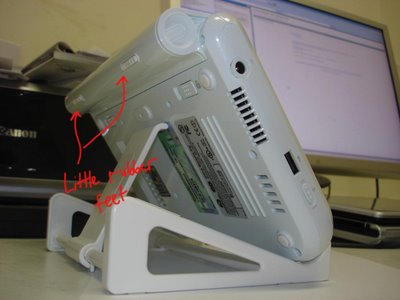
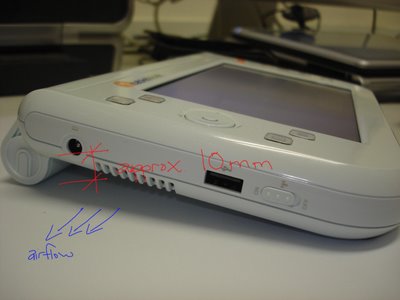
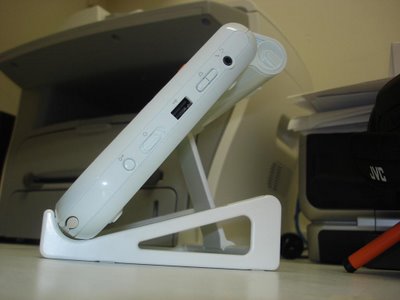
I must say that the short period we spent together I really enjoyed the feel and the ergonomics that the battery adds to the eo. Firstly I love the way it sits off the desk and has better airflow (as opposed to laying flat on its back); I also enjoy the benefits the battery added to carrying the device in one hand, or under one’s palms.

Read More..

Android 4 4 KitKat running on the Google Nexus new code named Hammerhead

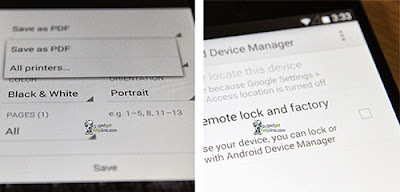
Page Gadget Helpline has recently posted some pictures of the supposedly run Android 4.4 KitKat on the new Nexus device codenamed " Hammerhead " . The build is packed on 28/8 and still called Key Lime Pie KitKat  , not to change what Google had disclosed. Speaking of new things , the installation of the system now comes with the option " Payment " to configure the payment via smartphone . We can also see the option to " Printing " , which comes under the Print button in some applications , suggest that Google will integrate a model in which documents directly from Android devices . In addition to the transfer of information to the printer ( also can be printed out online service Google Cloud Print ) , we can also save files as PDF .
Android 4.4 KitKat running on the Google Nexus new

Read more »
Read More..

6 Fastest Smartphone on Earth Current part 2

LG Optimus G Pro

Fastest smartphone, Packedwith a quad-core 1.7 GHz QualcommSnapdragon 600 GPUlike HTC andAndreno 320, LGOptimus G Prooffers exceptional speed plus a larger display screen.
In some tests, the Optimus M Pro is not inferior to HTC andSamsung Galaxy S4in terms of speed.
The drawback is a 5.5 inch screen which some people mightthink it is too big, but the screen size is perfect for playing video gamesand playing satisfaction.
LG Nexus 4

Fastest smartphone, LG Nexus 4 also comes withgreat speed whowrapped a quad-core 1.5 GHz Qualcomm SnapdragonS4 Pro.
In terms of specs, the Nexus 4 may not be as flashy as a smartphone with a class on it.
But you have to remember is labeled GoogleNexus of thissmartphone that freesusers with Androidstandards creation and day-to-day useas well as the navigation is verysmooth.
Samsung Galaxy Note 2

Fastest smartphone, When first launched, the Galaxy Note 2 is the monster first with quad-core processor.
Packed with a quad-core processor 1.6 GHz Cortex A9 Exynos chipset Samsung, play games on the Galaxy Note 2 is getting comfortable with a large screen measuring 5.5 inches.
Galaxy Note 2 is able to survive at the top of the market even though its release was a year ago, and perhaps position will only be replaced by its successor, the Galaxy Note 3 in the near future which will be presented by Samsung.

HTC One X +

Fastest smartphone, HTC X + fame has far overtaken HTC today. But the performance is still consideredthe best in terms of speed and comes with a quad-core processor Nvidia Tegra3, a very prominent name in thecomputers graphics performance.
Another advantage of the HTC One X + is 4G LTE connectivity.

Read More..

Samsung Mobile Unpacked event on 4 9 to showcase the Galaxy Note III

The successor to the Galaxy Note II will appear on 4/9?

According to an internal page of Android Geeks, Samsung Mobile Unpacked event in Berlin on September 4 this year to showcase the Galaxy Note III. The event took place two days before the IFA 2013 and it officially started with the same tradition of Samsung in recent years. The source added that the invitation to confirm the occurrence of Note III will be sent to press "on a certain point in August." Note III is rumored that there will be two versions, one using the LCD screen, an OLED screen use. Both panels of the same size 5.7 "(some would say the news is exceeded 6") Full-HD resolution, Snapdragon processor Exynos 5 800 or Octa, supporting LTE-A. Samsung currently holds 5% of Wacom, the company famous for drawing graphic pen, so most likely S-Pen stylus on the Note III will be enhanced with many new features. A device
Read more »
Read More..

Video On hand fake phone Galaxy S4 and Galaxy S4 phone genuine


On hand fake phone Galaxy S4 and Galaxy S4 phone genuine


Today we will look at a hypothetical machine Galaxy S4 see how it is. Not only Galaxy S4, there are many other devices as well be counterfeit: One HTC, Nokia Lumia ... and fakes are also many different types. The Galaxy S4 faked mentioned in this video it looks to 80% compared to the original phone (an approximate figure), but the design details and the software is very similar. Even the special features of Samsung as Smart Pause, Air View and Air Gesture and also appear to work on this machine clones.
Read More..

Guide to download and install the iOS Control Center 7 on Android turn off the connection and convenient app launch


When announcing iOS 7, Apple has introduced a new feature for its operating system called the Control Center. This is the area that allows us to quickly turn off the connection used, adjust brightness, volume and launch a number of applications. Now, the developers at Hi Tools Studio has been this feature on the Android interface, function and manner of operation is similar to the iOS 7. After you install Android into the Control Center, you can activate it by dragging from the top edge of the screen, no matter whether you're at the main screen, lock screen or application is used. You can also adjust the size of the active area Control Center according to their preferences. Right now you can download the free Control Center on Google Play Store.

Control Center is more convenient than Quick Settings default Android 4.2 and Quick Settings Notification
Read more »
Read More..

Powered by Blogger.